Google Ads cloaking: AdsBot, the Circumventing Systems policy and how a cloaker is configured
7 min · September 22, 2026
Meta reviews the landing page, not just the creative, and can re-review a running ad at any time. This guide goes through Meta's own documentation: which crawlers hit your page, how long review takes, which signals separate a reviewer from a buyer, and how the filter rules are set in the KLO cabinet.
Facebook ads cloaking is a traffic filter that sits between a Meta campaign and your landing page. It decides who sees the white page and who sees the offer: Meta's crawlers and reviewers get an ordinary, policy-compliant site, a real person who clicked the ad gets the pre-lander or the offer. This guide has no generic advice about "bypassing moderation". We took Meta's documentation on ad review and on its crawlers, compared it with what we see in KLO logs, and collected the rules that actually separate a review from a buyer.
If you are new to the topic, our Russian guide on how cloaking works covers the basics. Here we stick to Meta specifics.
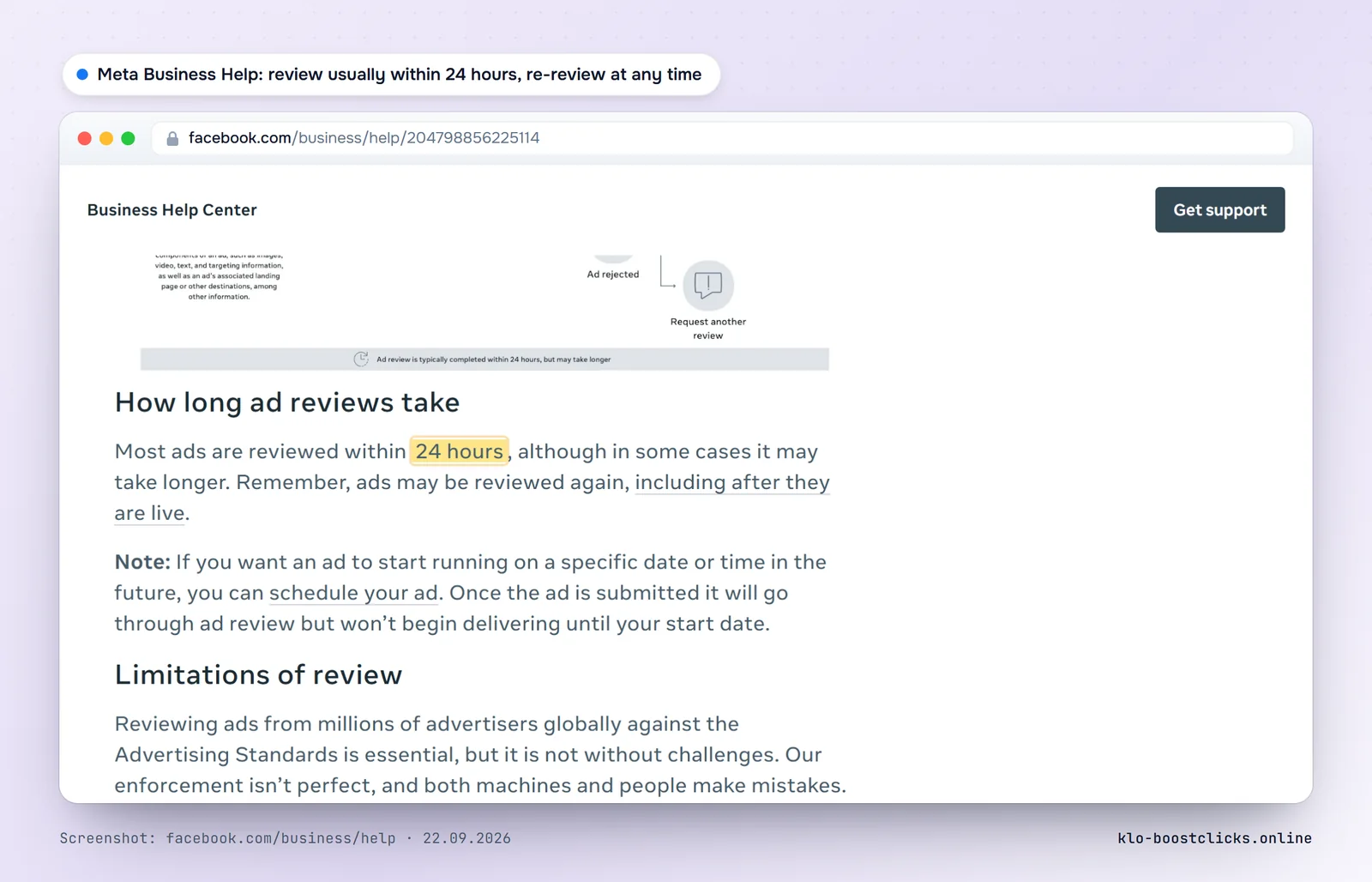
Meta's Business Help Center describes the process plainly: review starts automatically after an ad is created or edited and, with some exceptions, takes up to 24 hours. Most of it is automated, some ads go to a human reviewer. An ad can be reviewed again at any moment, including ads that are already running.
Three points in that description matter for a cloaker.
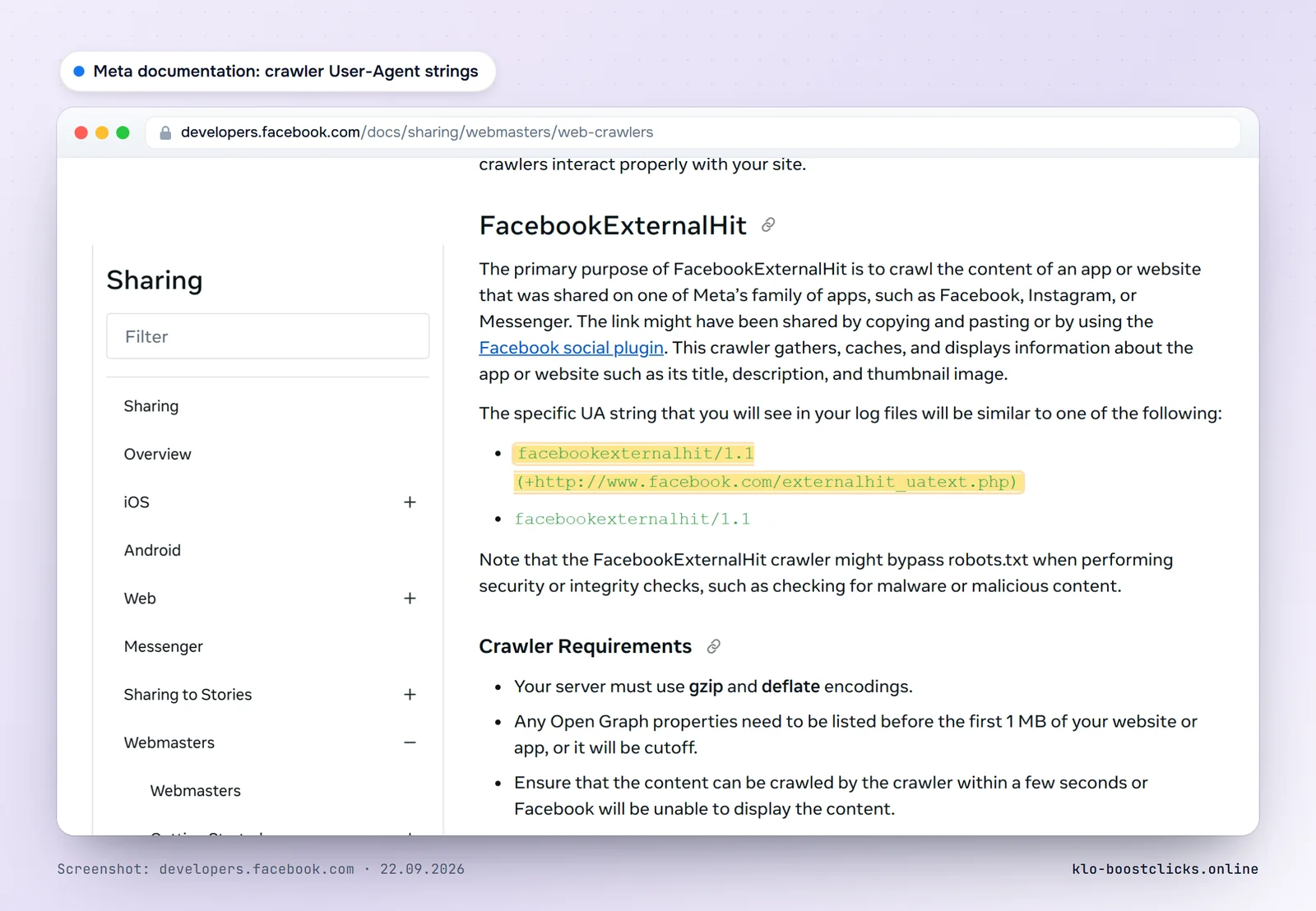
Meta publishes its crawler list and the exact User-Agent strings you will see in server logs. Four of them matter for Facebook ads.
| Crawler | String in logs | Why it comes |
|---|---|---|
| FacebookExternalHit | facebookexternalhit/1.1 (+http://www.facebook.com/externalhit_uatext.php) | Fetches content for links shared on Facebook, Instagram and Messenger. The docs say it may bypass robots.txt for security and integrity checks. |
| Meta-ExternalAds | meta-externalads/1.1 | Crawls web content "to improve ads and other business products". This is the closest thing to an ad landing page check. |
| Meta-ExternalAgent | meta-externalagent/1.1 | Collects content for AI model training and indexing. |
| Meta-ExternalFetcher | meta-externalfetcher/1.1 | Fetches individual links on a user's request. |
The line about robots.txt deserves attention. You cannot keep the crawler out with robots.txt: Meta states directly that FacebookExternalHit may ignore it during security checks. So the decision has to be made by a filter on the server, not by robots.txt.
All of these crawlers come from Meta's own networks. Meta's autonomous system is AS32934, and any serious filter keeps its prefixes in the database. In KLO logs the visits with facebookexternalhit, meta-externalagent, meta-externalads and meta-webindexer user agents over the summer of 2026 came almost exclusively from Meta prefixes, and the same prefixes also produced visits with ordinary browser user agents. That second group is the interesting one.
A crawler with a declared user agent is the easy case: the string is in the list, the IP is in Meta's ranges, the answer is white. The hard case is a check that looks like a browser. These are the signals that work in practice, roughly in order of reliability.
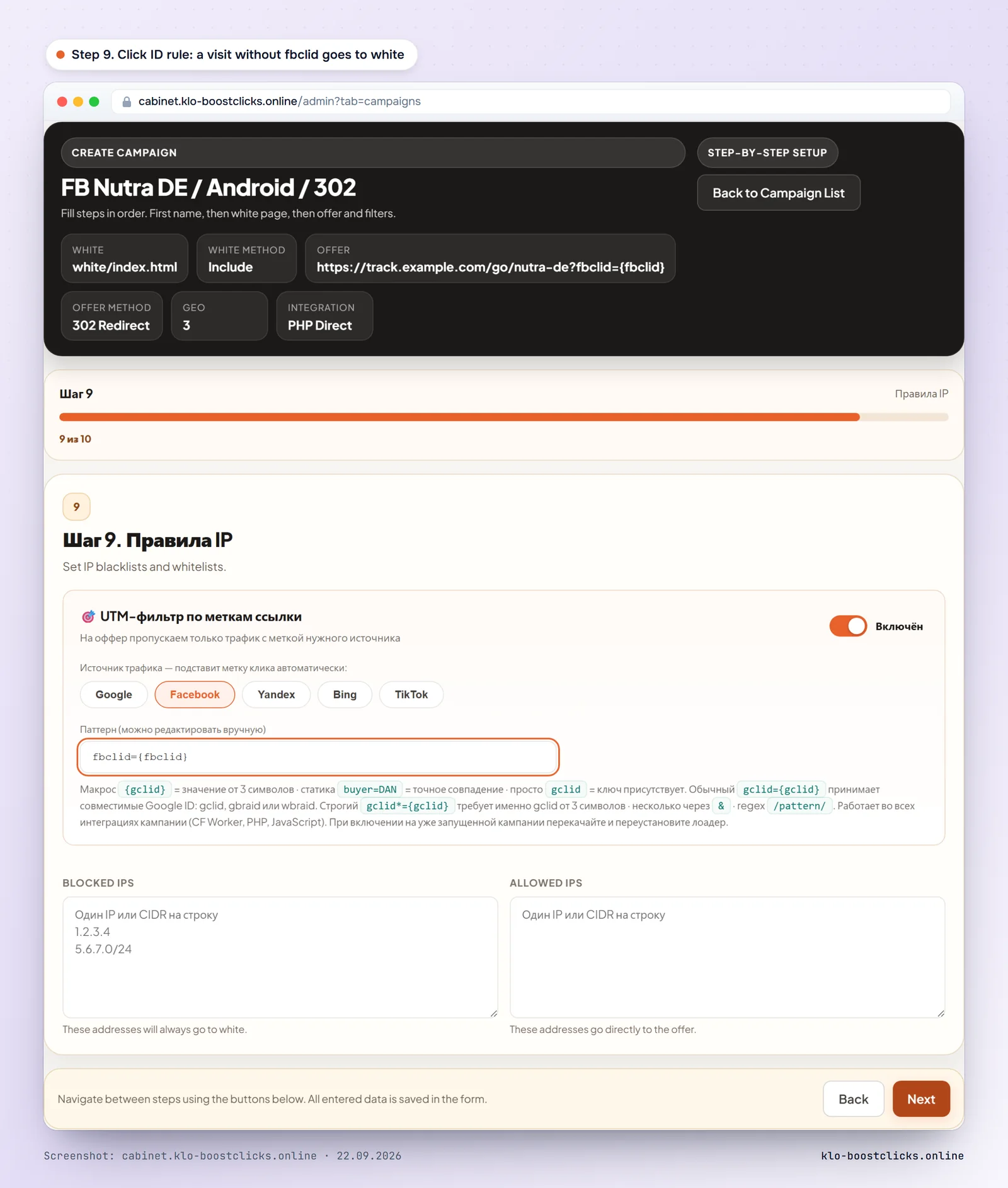
fbclid in the URL. A visit to the entry URL without it is a crawler, a manual open or someone who copied the link.en-US only. Not a hard rule, but a strong one in combination.navigator.webdriver, software WebGL renderers, no mouse movement, zero plugins on a desktop user agent. These come from a JS layer and catch tools that spoof everything else.KLO combines these into a decision on the first request, before any HTML is sent. There is no redirect the visitor could notice, and there is no way to "click through" to the offer by hand.
Below is the sequence for KLO. Other services have similar steps, with different field names.
Build the white page before you connect the filter: the topic matches the creative, there is a contact page and a privacy policy, the page is fast, the pixel is installed. Our white page checklist lists every item. The offer or the pre-lander is prepared separately and never links back to the entry domain.
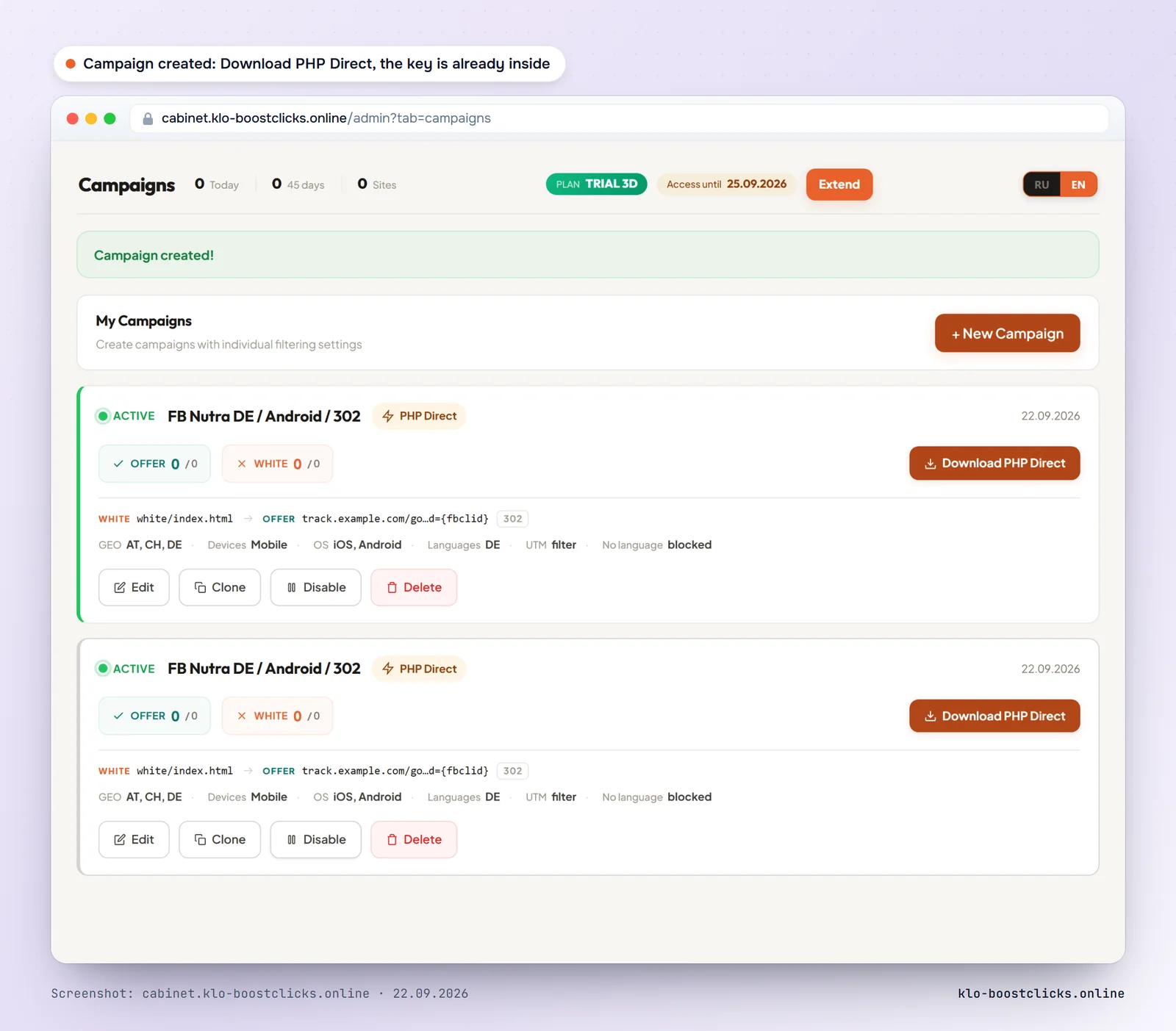
Create a campaign and pick Facebook / Meta as the source. Set the countries and devices from the campaign's targeting, enable the click ID requirement (fbclid), and enter the white and offer addresses. For a new campaign turn on warm-up: the first N clicks go to white, so that the review after launch sees a normal site.
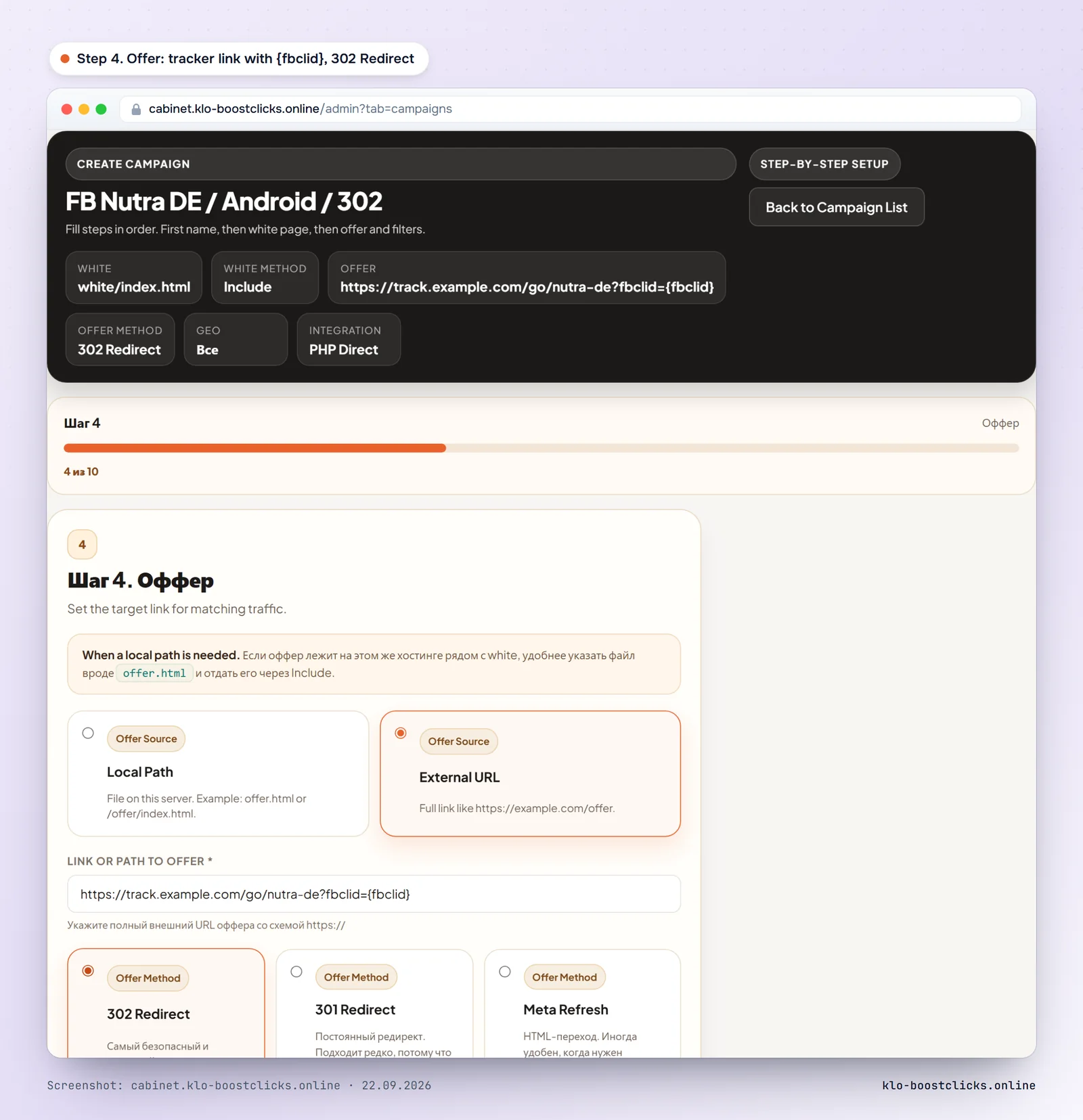
For a regular landing page download the PHP loader from the cabinet: the secret key is already embedded, the file goes next to the landing page. WordPress has a plugin, Keitaro a filter module, React, Vue, Next.js and Node.js the @boostclicks/klo package. On the DOMINATION plan the decision is made by a Cloudflare Worker and there are no cloaking files on your hosting at all.
Open the entry URL from a phone on mobile data: you should see the offer. Open it through a VPN, from office Wi-Fi and from a headless browser: you should see white. Then paste the URL into Meta's Sharing Debugger: it fetches the page with facebookexternalhit and shows what the crawler received. The correct result is the title and description of the white page.
After launch watch the white share, the decision reasons and the visits without a click ID in the KLO cabinet. Meta re-reviews after every change to creative or targeting, so do not edit running ads without a reason: each edit is a new review and a new chance to be looked at from an unexpected network.
A manual review from an ordinary phone on a carrier network with a real click from the ad is indistinguishable from a buyer. In that case the reviewer sees the offer, and only the offer itself decides what happens next. A filter also does not fix a banned vertical, a payment processor that rejects the product, or an account with a history of violations. It removes the automated and the semi-automated part of the review, which is most of it, and leaves the rest to the quality of your pages.
Cloaking is against Meta's Advertising Standards, and an account can be restricted if it is detected. The techniques above reduce how often that happens; they do not make it impossible. Treat the filter as a risk reduction tool, not as a guarantee.
No. Meta's Advertising Standards prohibit circumventing review systems, and showing reviewers a different page than users is exactly that. Advertisers use cloaking to protect campaigns in grey verticals, and the account risk is real. This guide explains how the review works so that you can weigh that risk with facts.
Meta says most ads are reviewed within 24 hours, with exceptions that take longer. Ads can be re-reviewed later at any time, including running ads.
Yes. Changes to targeting, creative, optimization or billing event send the ad back to review. Budget, bid and schedule changes do not. Meta also reserves the right to review any ad again without changes.
The documented crawlers are facebookexternalhit/1.1, meta-externalads/1.1, meta-externalagent/1.1 and meta-externalfetcher/1.1, all from Meta's AS32934. Manual checks use ordinary browsers and are identified by network, missing fbclid, and device or geo mismatch instead.
Judge by three things: a current database of Meta and data center networks, a decision made on the server before the page is sent, and the ability to require the click ID and match the campaign's geo and devices. KLO does all three and gives a 3-day trial without a card; Adspect, Palladium and Cloak It are the other services we compare in the pricing guide.
KLO keeps bots, ad reviewers and fraud away from your offer page. 3-day trial with full START plan features, no card required.
Start for freeGuides for the English-speaking market: Facebook and Google Ads, service pricing, white pages. More guides are available in Russian.